
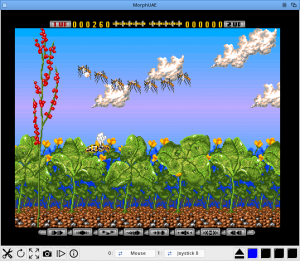
 MorphUAE ist eine auf MUI basierende Variante von E-UAE für MorphOS mit einigen zusätzlichen Funktionen. Die Kickstart-Dateien müssen in den Ordner „Kickstarts“ kopiert werden. Die Standardnamen, den der Emulator hier verwendet, lauten:
- Kick1.rom: OCS
- Kick2.rom: ECS
- Kick3.rom: AGA
- rom.key: AmigaForever/Cloanto-Schlüsseldatei (sofern verschlüsselte ROM-Dateien vorliegen)
Der Name kann jedoch beliebig gewählt und im Einstellungsfenster für jeden Hardwaretyp angepasst werden. Sind die Dateien wie in der obigen Liste benannt, sollte der Emulator direkt und ohne weitere Änderungen laufen. MorphUAE wird mit AROS-m68k-ROM-Images ausgeliefert, die verwendet werden, falls keine echten Amiga-Kickstarts gefunden werden. Für beste Kompatibilität wird aber empfohlen, echte Amiga-Kickstart-ROM zu verwenden.
Benötigt werden außerdem MorphOS 3.x oder höher und TrueColor-/24-Bit-Grafikschirm. Die Quellcodes sind auf GitHub verfügbar.
Update von amiga-news.de:
Der Autor Stefan Blixth hat uns freundlicherweise auf unsere Nachfrage eine (unvollständige) Zusammenfassung der wichtigsten Änderungen zur Verfügung gestellt:
„MUI-GUI, the render is made as a MCC class which makes is easier to maintain I think. Since it’s a MUI application and you are running on MorphOS 3.x it’s easy to send it to multiple monitors on the fly, this was not possible in the orginal version.
The main window have a toolbar much like Cloantos AmigaForever GUI, easy to access. The toolbar can be hidded with an keycombination (if you want to).
I’ve made a specific MUI-Class (LED-style) for displaying the DFx-status when the system accesses the ADFs, the LED’s are also clickable to be able to attach an ADF to the specific DF0-DF3-drive.
You can take a screenshoot (saves in PNG) which I don’t think ever worked in the old E-UAE on MorphOS previously.
The main GUI have options to swap attached joysticks/mouse on the ports directly in runtime, this was not possible previously.
You can use the included fallback AROS Kickstart ROM which was not working at all in the previous E-UAE since the extended ROM (which is needed) was not activated (for some reasons).
The entries below „What’s new“ is just what I pushed to the github for the next version 1.1, this is not ready for public use yet. But It’s possible to drag and drop multiple disk images to the main window and the emulator will automatically distribute them over the available DF0-DF3 devices. And that the ASL requester will remember the name+position of the previously used path+image file when you want to change it later on.
I might have missed some stuff, I’ve been polishing this application a rather long time before releasing it to the public since my main prio is stability and ease of use and I think I’ve made it more robust than the old version ever was.“